Installation Transmutr on Mac ok
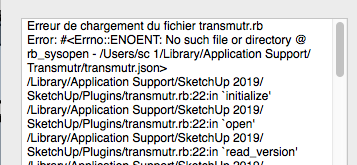
When you launch sketchup software an error message appear
Thanks for the bug report @stefanoc
Can you confirm that the file /Users/sc 1/Library/Application Support/Transmutr/transmutr.json does not exist on your computer?
Can you also check if /Library/Application Support/Transmutr/transmutr.json exist?
Actually, we found a solution to this bug. We’ll release a new version of Transmutr soon.
Thanks for your help!
The same issue on macos 10.13.6 and SketchUp 2017.
Console error to Start SketchUp:
Error al cargar archivo transmutr.rb

Error: #<Errno::ENOENT: No such file or directory @ rb_sysopen - /Users/Oxer/Library/Application Support/Transmutr/transmutr.json>

/Library/Application Support/SketchUp 2017/SketchUp/Plugins/transmutr.rb:22:in `initialize'

/Library/Application Support/SketchUp 2017/SketchUp/Plugins/transmutr.rb:22:in `open'

/Library/Application Support/SketchUp 2017/SketchUp/Plugins/transmutr.rb:22:in `read_version'

/Library/Application Support/SketchUp 2017/SketchUp/Plugins/transmutr.rb:27:in `<module:Transmutr>'

/Library/Application Support/SketchUp 2017/SketchUp/Plugins/transmutr.rb:1:in `<top (required)>'
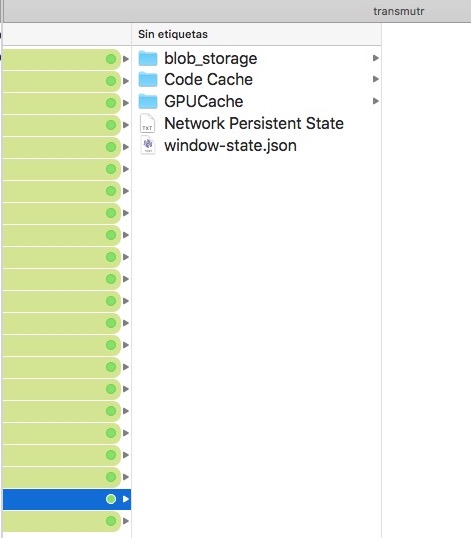
The folder exists but the transmutr.json file not. This is the contents of the folder:
Please try Beta 2: [BETA] 1.2.0-beta.2
If you still have a blank window, please try to give System Permissions to Transmutr, and tell us if it fixes the blank window. Click here to learn how to give System Permissions to a MacOS app.
I still have a blank window, and I changed the permissions.
Thanks a lot for your feedback. We have been able to reproduce the blank screen issue in a Virtual Machine (Transmutr works fine on our physical Macbook). We will investigate.
